
Picking Route Criteria
Set up weight brackets to decide which items get picked first, matching the picking route to your warehouse.
How it works
LogisticsWMS always calculates the fastest picking route, cross-referencing each item's location on the pick list with the warehouse layout. But the fastest route isn't always the one a warehouse wants — weight, dimensions or storage conditions can call for a different order.
Picking Route Criteria solves that: you define weight brackets that make heavier (or lighter, depending on the priority you give them) items get picked first.
Each item needs its weight filled in on its record — either manually or imported from your invoicing software (for example, Moloni). Then you set the weight brackets that make sense for your warehouse, and a priority for each: the lower the number, the sooner that bracket gets picked.
For example, a 10kg-15kg bracket with priority 1 means that whenever an item of that weight is on the picking list, it's the first one picked.
How to configure
Before enabling this setting, check that your items already have their weight filled in:
- Manually, on the item record: How to create a product
- By syncing with the Moloni plugin: Synchronize Item Properties
Instructions
-
Go to Settings, in the sidebar.
-
In the Outbound tab, select the Picking Route Criteria tab.
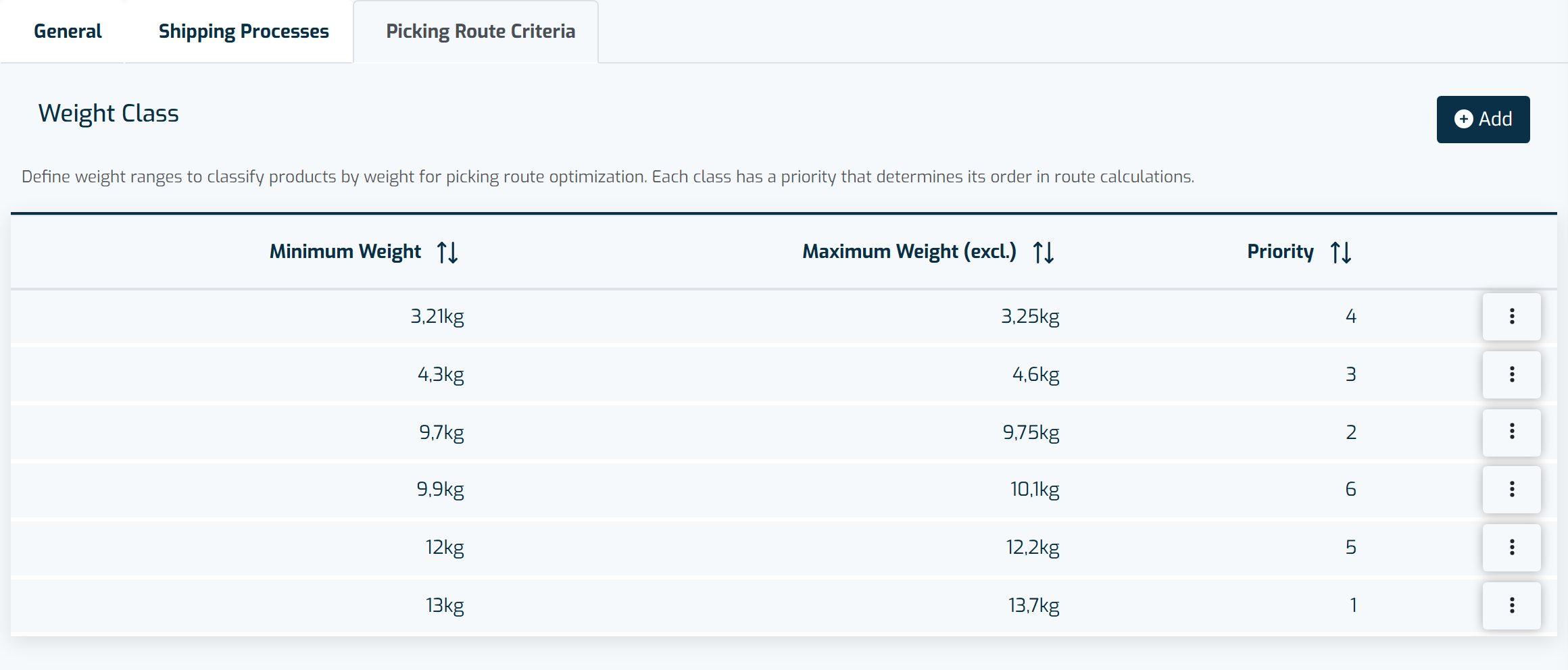
Weight brackets and their priority determine the pick order of items during picking. -
Click + Add.
-
Configure the weight bracket:
- Minimum weight
- Maximum weight (excl.)
- Priority — 1 is the highest priority
-
Click Save.
-
Repeat for every bracket you need.