
How to configure a Reception Process?
Define the steps and rules of the receiving process in LogisticsWMS to fit inbound flows to your warehouse reality.
A Reception Process determines how an inbound delivery is handled — which document type triggered it, and whether stock gets put away automatically as each line is confirmed or waits in the checking area instead.
Instructions
-
Go to Settings, in the sidebar.
-
In the Inbound tab, select the Reception Processes tab.
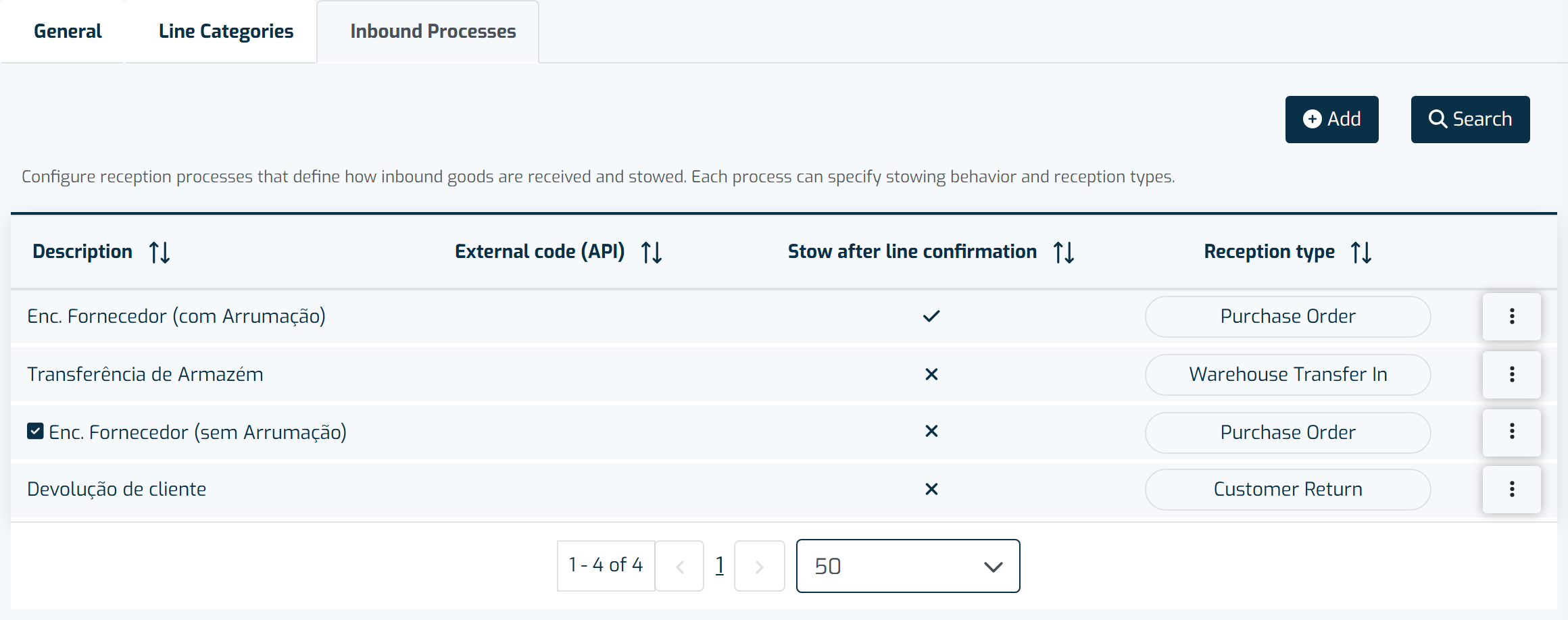
Each reception process defines the reception type, whether it puts away automatically after a line is confirmed, and whether it is the default process. -
Click + Add.
-
Fill in the fields:
- Description (mandatory)
- External Code (optional) — if there's an integration with external software, use the same code as in that software
- Default Process (optional)
- Store after line confirmation (optional)
- Reception Type (mandatory)
-
Click Save.
Repeat for every kind of inbound flow your warehouse handles differently — for example, purchase orders with and without automatic put-away, warehouse transfers, or customer returns.