
Profiles and Skills – How Permissions Work
Understand how profiles and skills work in LogisticsWMS, and how they decide what each user can see, change and do.
User permissions are defined by two main elements: the profile and the skills assigned. These two elements work together to ensure each user only has access to what they need in their daily tasks.
Types of Profiles
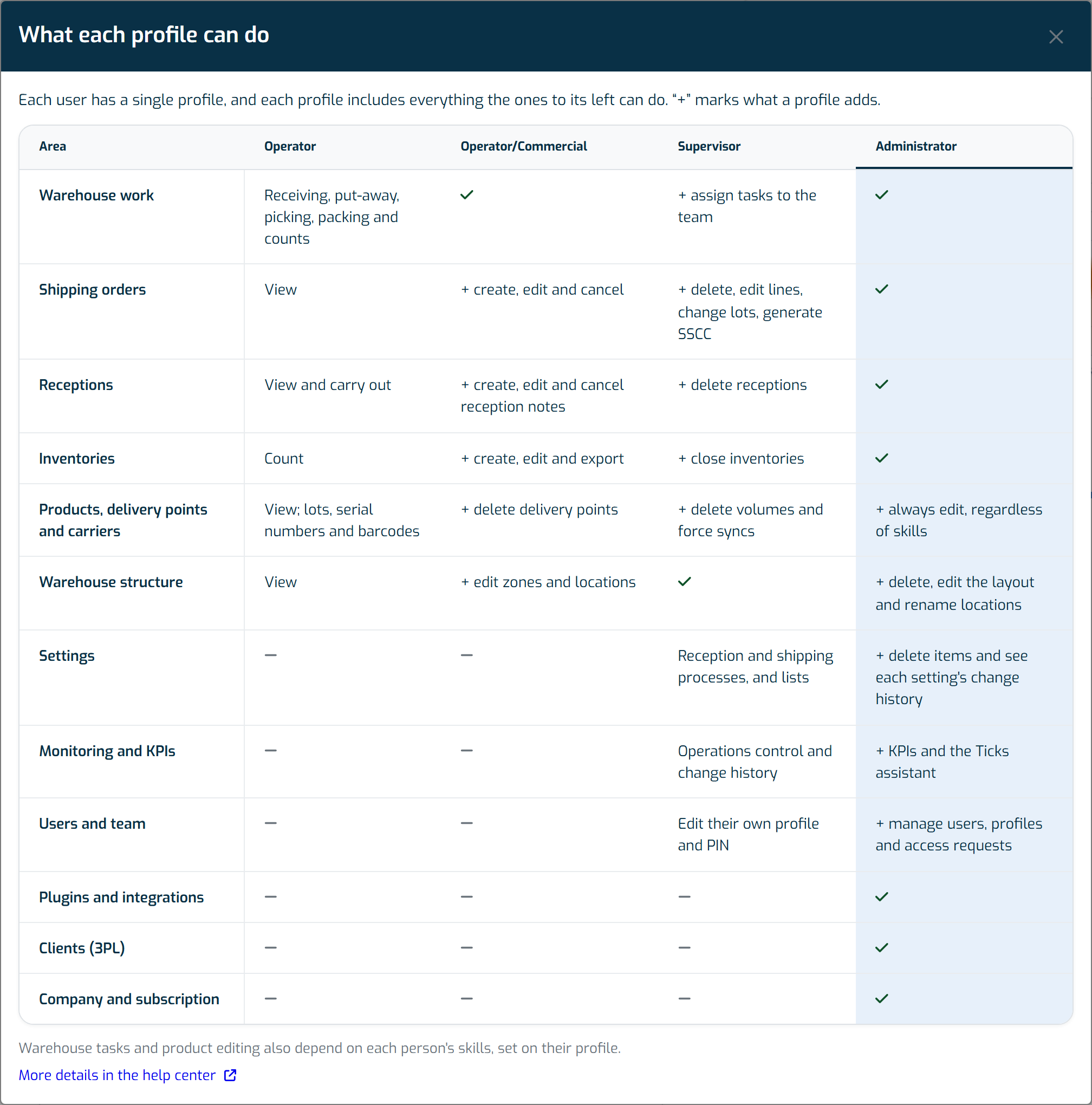
Each user has a single profile, chosen from four. Each profile includes everything the ones before it can do:
- Operator: warehouse work — receiving, put-away, picking, packing and counts.
- Operator/Commercial: everything an Operator does, plus creating and managing orders, reception notes, inventories, zones and locations.
- Supervisor: everything an Operator/Commercial does, plus correcting, deleting, closing inventories, assigning tasks and setting up processes.
- Administrator: everything a Supervisor does, plus users, KPIs, the Ticks assistant, integrations, the warehouse layout, company and subscription.
Only Administrators choose or change someone's profile, in the Profile field: when inviting a person or on their profile (see Add and manage users). Each option in the list explains what that profile adds. Select Compare profiles to open the What each profile can do table, with the areas of the app side by side and the chosen profile's column highlighted.
Note
If a user had more than one profile, the Profile field shows the highest. The next time that user's details are saved, only that profile is kept. They lose no access, because the highest profile already includes the others.
Skills
Skills are more granular and define exactly what the user can do within their profile. You find them in each user's profile, in the Skills section:
- Receive
- Put away
- Picking
- Packing
- Inventory
- Entities
- Settings
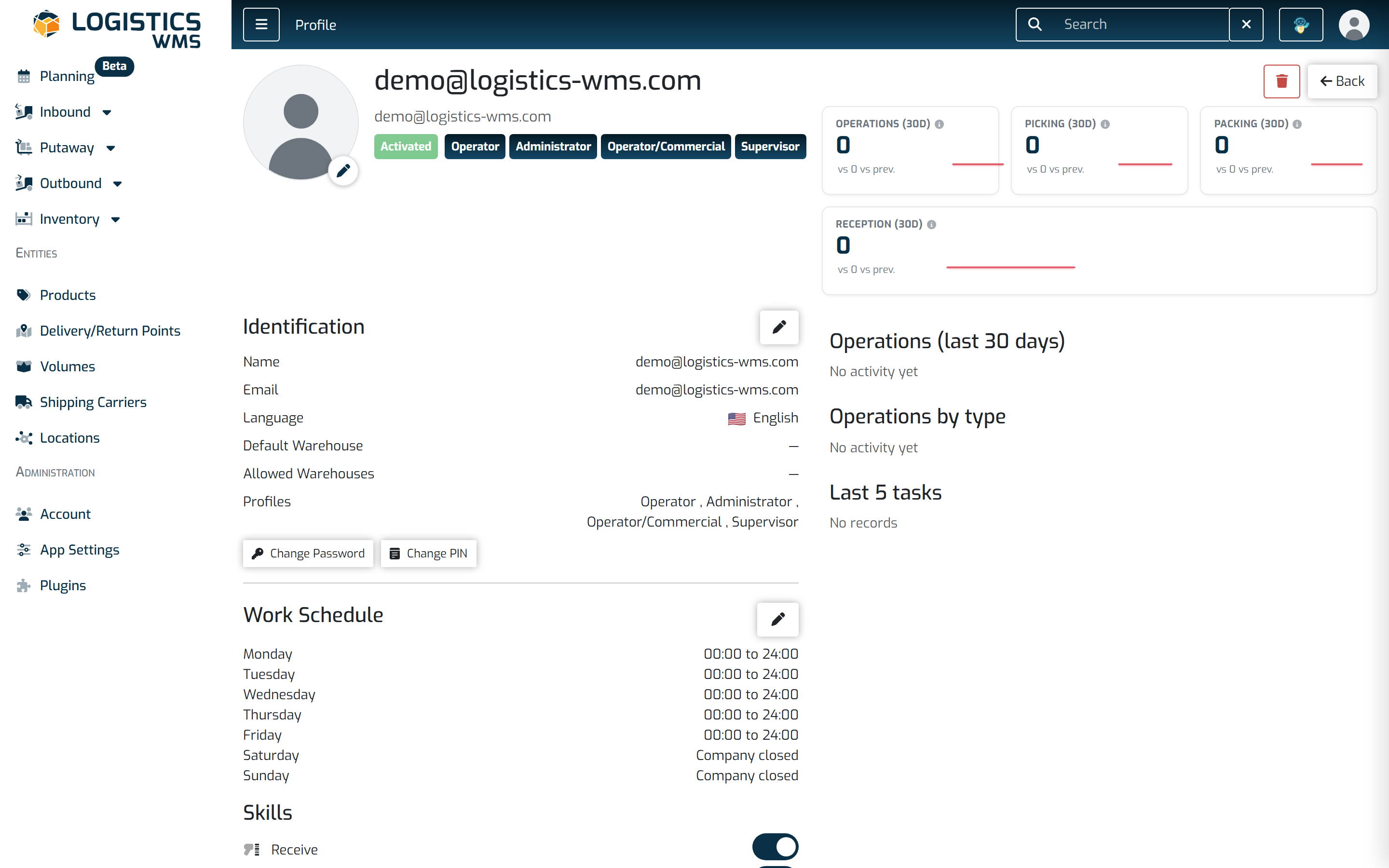
The first five are related to operational tasks. For example, if a user doesn't have the Receive skill, they won't be able to see or use that feature, even if they have access to the app itself.
Skills like Entities and Settings control access to more administrative menus.
Who can change products, delivery points, carriers and receptions
Two skills also decide who can change records, whatever the profile:
- Entities: creating, editing, inactivating and deleting products (including their photos), delivery points and carriers.
- Receive: creating and editing receptions, changing their status and integrating them.
Administrators can always do both, even without these skills. For every other profile, the skill decides: an Operator with Entities can edit products, and a Supervisor without it cannot. Without the skill, the screen does not show the options to change those records.
Deleting a reception, or deleting volumes (one or several), is for Supervisors and Administrators only.
Note
If someone can no longer edit a product, a delivery point, a carrier or a reception, check that the right skill is switched on in their profile.
Change history
On the details of a product, a delivery point, a reception or a shipping order, Supervisors and Administrators see the record's change history from the Audit button. Other profiles only see who created the record and who last changed it.
How do they work together?
Think of profiles as the foundation and skills as the fine-tuning. A Supervisor might have broad access to the app, but they can only perform inventories if they also have the Inventory skill.
The same goes for other profiles: an Operator may also have the Inventory skill, but their actions will be more limited, such as counting or logging items, without the ability to create or close inventories.
This way, each person sees and does exactly what makes sense for their profile. To see, area by area, what each profile includes, open Compare profiles in the Profile field.