Meet Ticks, your AI assistant
Ticks answers questions about stock, receptions, shipping orders and reports in plain language, and can act for you, with your confirmation.

What is Ticks
Ticks is the AI assistant built into LogisticsWMS. Instead of digging through screens and filters, you can just ask it a question in plain language: "How much stock do we have of product ABC123?", "Which orders are delayed?", "Why is this stock blocked?", and get an answer with links straight to the records involved.
Until now, Ticks was only available to the LogisticsWMS team. As of version 3.1.0, every account Admin has access.
Where to find it
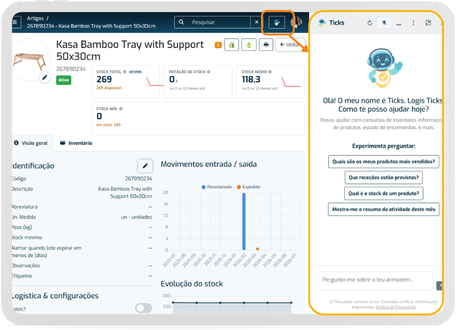
Open Ticks from its icon in the top bar of the application. It opens as a side panel you can keep next to your work (with a tidier header, quick actions on each message, and a slim collapsed rail when you need the screen space) and you can expand it to a full-screen view when you need more room. Ticks pays attention to the page you're on: open it from a product page and it already knows which product you mean.
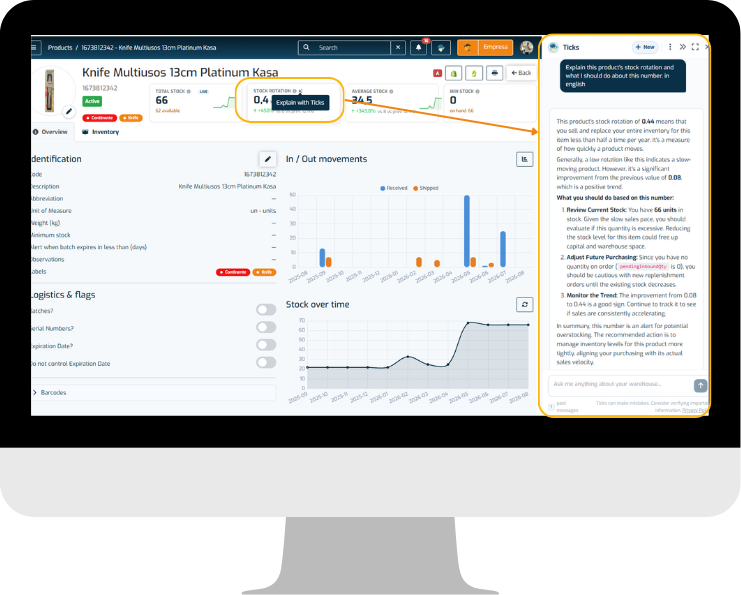
On product pages, each stock KPI card also has its own Explain with Ticks button: click it and Ticks opens with that exact number already in context, ready for follow-up questions.
What you can ask it
Stock & products
- "How much stock do we have of [product]?"
by product, barcode or location - "What's expiring in the next 30 days?"
- "Which products haven't moved in months?"
dead stock - "What are my top-moving products?" or "Show me my slow movers"
filters by ABC classification - "What's sitting in quality control right now?"
- "What are our best (or least) selling products this month?"
- "What should I reorder, and why?"
weighs low or zero stock against recent sales
Receiving
- "What receptions are scheduled for today?"
- "How's reception [code] progressing?"
- "Are there any discrepancies on this reception?"
Shipping
- "What orders are pending?"
- "Which orders are delayed, and by how much?"
- "Show me the lines on order [code]"
- "What's our picking error rate?"
- "Which clients bought the most this month?"
Reports & traceability
- "Generate an inventory report for [warehouse]"
- "Trace lot [code]"
where did it end up? - "Show me the movement history for location [code]"
- "What changed on order [code]?"
full audit trail - Pharma accounts can also ask for an NMVS compliance report.
Efficiency
- "What's our average picking time?"
- "How's [operator] performing this week?"
- "How much weight has [operator] picked in the last 30 days?"
- "Who's picked the most weight this month?"
ranks every operator, not just one you name - "What's each operator's units or weight per hour?"
productivity measured however makes sense for the work, not just lines per hour - "Which documents did [operator] handle this week?"
lists the receptions, orders or inventories, with links to each one - "What's our order completion rate?"
- "How accurate is our inventory?"
- "How full is the warehouse right now?"
Settings & configuration
- "How do I turn on [setting]?"
- "What does [setting] actually do?"
- "What's included in our plan, and which integrations do we have active?"
- Ticks also picks up the words you use. If you call locations "aisles", it learns that and uses it back.
Troubleshooting
- "Check for data inconsistencies"
- "Why can't this order be completed?"
- "Is this barcode valid?"
- "Why is this stock blocked?"
Getting things done
Ticks isn't limited to answering questions:
- It can suggest where to put away a pallet, or recommend a storage strategy.
- It can record a stock adjustment for you (damage, internal consumption, and similar reasons). It always shows you exactly what it's about to do and asks you to confirm before anything is saved.
- Ask it to export data to a file (CSV, Excel or PDF); even large result sets export in full, without being cut short.
- If the answer isn't in your data, Ticks can search the web for it.
- Ask a "how do I..." question and Ticks will search the Help Center for you and summarise what it finds.
Good to know
- Ticks replies in the language you write to it in. English, Portuguese, Spanish, French and Italian are all supported.
- Your conversations are kept, so you can pick up where you left off and search back through past ones.
- The first time you open Ticks, you'll be asked to confirm you're comfortable with your warehouse data being used to answer your questions.
- Ticks only ever states facts and links backed by your actual data; if it can't find or verify something, it says so instead of guessing.
- If an answer from Ticks is long enough to hit the length limit, it tells you and shows a Continue the answer button, so you can pick up right where it left off instead of wondering if that was everything.